

SV600
Elegant and simple overhead Scanner.
Overhead scanner with a new perspective on scanning.
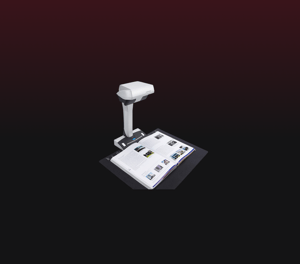
The ScanSnap SV600 is an overhead style contactless scanner that provides a new perspective on document scanning. Unlike the typical scanner, you can easily scan newspapers, magazines, books or documents of up to 30mm thick directly with the overhead LED, without cutting or damaging them.
Key Features
- A3 document scanning
- Multiple document scanning
- VI Technology for steady images
- Auto Book Correction and Point Retouch function to optimize scanned images
- Page Turning Detection function and Time Mode for smooth book scanning
- Compatible with PC and Mac
- Best experience with ScanSnap Home
Technical Specifications
| Scanner Type | Overhead, Simplex | |
|---|---|---|
| Scanning Speed (1) (A3 Landscape) | Auto mode (2) | 3 seconds / page |
| Normal mode | 3 seconds / page (3) (Color / Grayscale: 150 dpi, Monochrome: 300 dpi) | |
| Better mode | 3 seconds / page (3) (Color / Grayscale: 200 dpi, Monochrome: 400 dpi) | |
| Best mode | 3 seconds / page (3) (Color / Grayscale: 300 dpi, Monochrome: 600 dpi) | |
| Excellent mode | 3 seconds / page (3) (Color / Grayscale: 600 dpi, Monochrome: 1,200 dpi) | |
| Scanning Color Mode | Color, Grayscale, Monochrome, Automatic (Color / Grayscale / Monochrome detection) | |
| Image Sensor | Lens reduction optics / Color CCD x 1 | |
| Light Source | (White LED + Lens illumination) x 2 | |
| Optical Resolution | 285 to 218 dpi (Horizontal scanning), 283 to 152 dpi (Vertical scanning) (4) | |
| Document Size | Maximum | 432 x 300 mm (17.0 x 11.8 in.) |
| Minimum | 25.4 x 25.4 mm (1 x 1 in.) (5) | |
| Paper Weight (Thickness) | 30 mm (1.18 in.) or less | |
| Interface (6) | USB2.0 / USB1.1 (Connector Type: Type-B) | |
| Power Requirements | AC 100 to 240 V, 50/60 Hz | |
| Power Consumption | Operating Mode | 20 W or less |
| Sleep Mode | 2.6 W or less | |
| Auto Standby (Off) Mode | 0.4 W or less | |
| Operating Environment | Temperature | 5 to 35 °C (41 to 95 °F) |
| Relative Humidity | 20 to 80% (Non-condensing) | |
| Environmental Compliance | ENERGY STAR®, RoHS | |
| Dimensions (W x D x H) | 210 x 156 x 383 mm (8.27 × 6.14 × 15.08 in.) | |
| Weight | 3 kg (6.62 lb) | |
| Image Processing Functions | Deskew by text on document, Automatic size detection, Autonatic rotation, Automatic color detection, Book image correction (7), Multiple document detection (8) | |
| Included Items | AC cable, AC adapter, USB cable, Background Pad, Set-up DVD-ROM, Extenders (x2) | |
- Scanning speed may vary due to the system environment used. The time is measured between actual start of scanning and finish scanning.
- "Better mode" or "Best mode". Switch between "Better mode" and "Best mode" depends on the length of the document, A4 (portrait, 200 dpi), A6 size or below (300 dpi).
- Time between actual start of scanning (scanning pad) and finish scanning.
- Optical resolution differs due to different scanning angle on the same document.
- For documents of thickness over 5 mm, the maximum document size is 400 x 300 mm.
- Compatible with USB 3.0 port but connection will run as USB 2.0 speed.
- Automatically correct distortion caused by the curve of an opened book or magazine.
- Automatically crop several documents in one scan.
System Requirements
System Requirements for PC
| Compatible Operating Systems | Windows | ||
|---|---|---|---|
| 10 / 8.1 (32-bit / 64-bit) (1) |
7 (32-bit / 64-bit) |
||
| Driver / Applications (2) | ScanSnap Home (4) | Supported | Supported |
| ABBYY FineReader for ScanSnap™ | Supported | Supported | |
| Kofax Power PDF Standard (5) | Supported | Supported | |
| Hardware Requirements (3) | CPU (6) | Intel® Corelon 1.8 GHz (2 core) or higher (Recommended: Intel® Core™ i5 2.5 GHz or higher) | |
| Memory Capacity (6) | 2 GB or more (Recommended: 4 GB or more) | ||
| Display Resolution | 1,024 × 768 pixels or more | ||
| Disk Capacity (7) | 3.8 GB or more of the free hard disk space | ||
System Requirements for Mac
| Compatible Operating Systems | macOS v.10.12.4 or later | |
|---|---|---|
| Driver / Applications (1) | ScanSnap Home (3) | Supported |
| ABBYY FineReader for ScanSnap™ | Supported | |
| Kofax Power PDF Standard (4) | Supported | |
| Hardware Requirements (2) | CPU (5) | Intel® Core i5 1.4 GHz or higher (Recommended: Intel® Core™ i5 2.5 GHz or higher) |
| Memory Capacity (5) | 2 GB or more (Recommended: 8 GB or more) | |
| Display Resolution | 1,024 x 768 pixels or more | |
| Disk Capacity | 2.0 GB or more of the free hard disk space | |
- Operate Windows in desktop mode. ScanSnap scanners do not run with Windows® 10 ARM-based PCs such as Surface® Pro X (Microsoft®).
- Operating systems listed in this table are the only ones supported. Please refer to the ScanSnap Support Site for the latest support information.
- The ScanSnap device may not work if the connected computer does not meet these requirements.
- Installation requires a computer and Internet. Activation is also necessary for software use. Please visit the ScanSnap Support Site for download information.
- Please refer to the included license certificate to download the software.
- Scanning speeds may drop if recommended CPU, memory capacity and USB 1.1 requirements are not met.
- .NET Framework 4.7 or later must be installed. If it is not installed, it is installed with ScanSnap Home. Up to 4.5 GB of disk space is required for the installation.
*The system requirements may change depending on the duration of support and the support policy of the companies that make the software listed in the table above.
- Operating systems listed in this table are the only ones supported. Please refer to the ScanSnap Support Site for the latest information.
- The ScanSnap device may not work if the connected computer does not meet these requirements.
- Installation requires a computer and Internet. Activation is also necessary for software use. Please visit the ScanSnap Support Site for download information.
- Please refer to the included license certificate to download the software.
- Scanning speeds may drop if the recommended CPU, memory capacity and USB 1.1 requirements are not met.
*The system requirements may change depending on the duration of support and the support policy of the companies that make the software listed in the table above.
Find a Reseller
To purchase a Ricoh scanner, obtain support or find a reseller near you, please fill out the form below so our team can direct you.