

iX2500
Connected and efficent scanner.
Our flagship model scans more documents faster and offers greater connectivity for easier access to shared data from anywhere.
ScanSnap iX2500 is the evolved flagship model of the ScanSnap series, enabling scanning at higher speeds of 45 ppm/90 ipm (A4-size documents, color, 300 dpi). It comes with a large 5-inch touch screen to bridge the gap where the physical and digital meet. The device allows you to use your personalized settings anywhere, regardless of whether you are at home, the office, or a rental coworking space. It integrates seamlessly with digital services for utilizing scanned data and offers a user-friendly, stress-free experience.
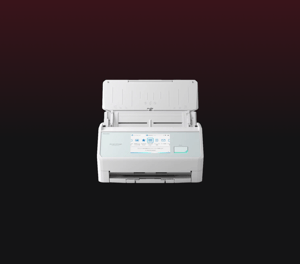
Key Features
- Intuitive 5-inch touch screen and smartphone-like usability
- Wi-Fi (2.4 / 5GHz*1) compatibility
- Secure connections with Wi-Fi 6/WPA3 support
- Speedy scans up to 45 ppm/90 ipm (A4-size documents, color, 300dpi)
- 100 sheets Automatic Document Feeder (ADF)
- For both individual and team use
- Balances high-speed scanning and fast startup with energy efficiency
- Best experiences with ScanSnap Home
- Your usual settings and cloud save destinations are applied to the scanner
- Data Sync*2: Transcending device boundaries
- Save directly to a network folder and cloud services, or send to email without the need for a PC
- Seamless integration with various digital services
- Environmentally conscious product design and packaging materials
Technical Specifications
| Scanner Type | ADF (Automatic Document Feeder) / Manual Feed, Duplex | ||
|---|---|---|---|
| Scanning color mode | Color, Grayscale, Monochrome, Automatic (Color/Grayscale/Monochrome*1 detection) | ||
| Image sensor | CIS x 2 (Front x 1, Back x 1) | ||
| Light source | 3 Color LED (Red/Green/Blue) | ||
| Optical resolution | 600 dpi | ||
| Scanning Speed*2 (A4 portrait) | Auto mode(Default)*3 | Simplex / Duplex: 45 ppm | |
| Normal mode | Simplex / Duplex: 45 ppm (Color / Grayscale: 150 dpi, Monochrome: 300 dpi) | ||
| Better mode | Simplex / Duplex: 45 ppm (Color / Grayscale: 200 dpi, Monochrome: 400 dpi) | ||
| Best mode | Simplex / Duplex: 45 ppm (Color / Grayscale: 300 dpi, Monochrome: 600 dpi) | ||
| Excellent mode*1 *4 | Simplex / Duplex: 13 ppm (Color / Grayscale: 600 dpi, Monochrome: 1,200 dpi) | ||
| Document Size | Normal Scan*5 | Minimum 50.8 x 50.8 mm (2 x 2 in.) Maximum 216 x 360 mm (8.5 x 14.17 in.) |
|
| Manual Scan | Minimum 50.8 x 50.8 mm (2 x 2 in.) Maximum 216 x 360 mm (8.5 x 14.17 in.)*7 |
||
| With Photo Carrier Sheet (Option)*1 | Minimum 25.4 x 25.4 mm (1 x 1 in.) Maximum 127 x 178 mm (5.0 x 7.0 in.) |
||
| With Carrier Sheet (Option)*1 | Minimum 25.4 x 25.4 mm (1 x 1 in.) Maximum 297 x 431.8 mm (11.69 x 17 in.) |
||
| With Booklet Carrier Sheet (Option)*1 | - | ||
| Long Paper Scanning*6 | PC | 3,000 mm*8 (863 mm in 32-bit) | |
| Smart Device / Cloud / NAS | Duplex: 863 mm Simplex: 1,726 mm |
||
| Paper Weight (Thickness) | 40 to 209 g/m2 (11 to 56 lb) A8 or less: 128 to 209 g/m2 (34 to 56 lb) Cards: 0.76 mm or less (Compliant with the ISO7810 ID-1 type) (Includes embossed cards in landscape orientation) |
||
| ADF Capacity*9 | 100 sheets (A4, 80 g/m2 or 20 lb) | ||
| Interface | USB | USB 3.2 Gen1 / USB 3.1 / USB 3.0 / USB 2.0 / USB 1.1 (Connector Type: Type-C) | |
| Wi-Fi | IEEE802.11a/b/g/n/ac/ax Frequency band: 2.4 GHz / 5 GHz*10 |
||
| Wi-Fi Connection Mode | Access Point Connect Mode (Infrastructure mode)*11 Direct Connect Mode (Ad-hoc mode)*12 |
||
| LCD | 5 in. color IPS touch screen | ||
| Power Requirements | AC 100 to 240 V, 50/60 Hz | ||
| Power Consumption | Operating | Approx. 17 W | |
| Sleep Mode(USB connection) | 1.0 W or less | ||
| Sleep Mode(Wi-Fi connection) | 1.4 W or less | ||
| When the power is off (default Normal mode) | 0.2 W or less | ||
| On standby in Fast mode (Wi-Fi off) | 1.0 W or less | ||
| On standby in Fast mode (Wi-Fi connection) | 1.4 W or less | ||
| Operating Environment | Temperature: 5 to 35 °C (41 to 95 °F) Relative humidity: 20 to 80% (Non-condensing) |
||
| Dimensions (W x D x H) | Min.: 292 x 161 x 159 mm (11.50 x 6.34 x 6.26 in.) (storage size) Max.: 292 x 477 x 286 mm (11.50 x 18.78 x 11.26 in.) (when the extension and the stacker are extended) |
||
| Device Weight | 3.5 kg (7.7 lb) | ||
| Environmental compliance | ENERGY STAR/RoHS | ||
| Multifeed detection | Overlap detection (Ultrasonic sensor), Length detection | ||
| Driver | ScanSnap Home (ScanSnap specific driver)
|
||
- Available only when connecting to a computer.
- Scanning speeds may vary due to the system environment. The values shown are the results of the evaluation under the following environment:
- Windows 11 / CPU: Intel Core™ i3-13100 4.5GHz / Memory: 8GB / Storage: SSD
- macOS Sonoma 14 / CPU: Apple M2 chip / Memory: 8GB / Storage: SSD / used Mac Mini (2023)
- Scans will be performed in 300 dpi (Color/Grayscale) or 600 dpi (Monochrome) if shorter sides are less than 105 mm, and in 200 dpi (Color/Grayscale) or 400 dpi (Monochrome) if shorter sides exceed 105 mm.
- This mode is not available when using ScanSnap Cloud or when saving directly to a network folder.
- A3 scans are possible with use of A3 carrier sheets.
- A document longer than A4 paper can be scanned one by one. Available in all modes except for “Excellent mode”.
- A3, B4, 11 x 17 in. document sizes are required to be folded in half.
- Up to 360 mm in Excellent mode.
- Maximum capacity varies, depending upon paper weight.
- Availability of 5 GHz Wi-Fi may vary depending on region.
- Access Point Connect Mode requires a Wi-Fi access point or router.
- 5 GHz Wi-Fi is not available with Direct Connect Mode.
System Requirements
System Requirements for PC
| Compatible Operating Systems*1 | Windows 11 / 10 (32-bit / 64-bit) | |
|---|---|---|
| Driver / Applications*2 | ScanSnap Home*4 | Supported |
| Kofax Power PDF Standard*5 | Supported | |
| ABBYY FineReader for ScanSnap™ | Supported | |
| Hardware Requirements*3 | CPU*6 | Intel or Intel-compatible processors |
| Display Resolution | 1,024 × 768 pixels or more | |
| Disk Capacity*7*8 | 3.8 GB or more of free disk space | |
System Requirements for Mac
| Compatible Operating Systems | macOS Monterey 12 or later | |
|---|---|---|
| Driver / Applications*1 | ScanSnap Home*3 | Supported |
| Kofax Power PDF Standard for Mac*4 | Supported | |
| ABBYY FineReader for ScanSnap™ | Supported | |
| Hardware Requirements*2 |
CPU*5*6 | Intel processor or Apple silicon |
| Display Resolution | 1,024 x 768 pixels or more | |
| Disk Capacity | 2.5 GB or more of free disk space | |
- Operate Windows in desktop mode. ScanSnap scanners do not run with Windows 11 and 10 ARM-based PCs such as Surface Pro X (Microsoft).
- Operating systems listed in this table are the only ones supported. Please refer to the ScanSnap Support site for the latest support information.
- The ScanSnap device may not work if the connected computer does not meet these requirements.
- ScanSnap Home Installation requires a computer and Internet. Please visit the ScanSnap Support site for download information.
- Please refer to the included license certificate to download the software.
- Scanning speeds may vary due to the system environment.
- Indicated disk capacity requirements apply when downloading ScanSnap Home.
- .NET Framework 4.8 or later must be installed. If it is not installed, it is installed with ScanSnap Home. Up to 4.5 GB of disk space is required for the installation.
*The system requirements may change depending on the support policies of the above system and third-party software.
- Operating systems listed in this table are the only ones supported. Please refer to the ScanSnap Support site for the latest information.
- The ScanSnap device may not work if the connected computer does not meet these requirements.
- ScanSnap Home Installation requires a computer and Internet. Please visit the ScanSnap Support site for download information.
- Please refer to the included license certificate to download the software.
- The ScanSnap device also operates with Apple Silicon-based Mac computers. Please refer to the ScanSnap Support site for the latest information.
- Scanning speeds may vary due to the system environment.
*The system requirements may change depending on the support policies of the above system and third-party software.
Find a Reseller
To purchase a Ricoh scanner, obtain support or find a reseller near you, please fill out the form below so our team can direct you.